BitSpeed Transfer Now Delivers Files on Windows
Until now the Windows archive of Transfer could print its version and politely refuse everything else. Transfer 0.4.0 changes that. Prepare, send, status, serve and clean all work on Windows, on local NTFS volumes, and a Windows sender can talk to a Linux receiver or the other way round. The protocol didn’t change, so 0.1.0 onward still interoperate.
Porting a tool like this isn’t about getting it to compile. Transfer makes one promise that matters: after a crash, the receiver never claims a chunk or a finished file it can’t prove. On Linux and macOS that promise rests on a short list of calls, mostly fsync, rename and hard links. Windows has its own versions of each, with different rules, so we wrote the mapping down before changing any code.
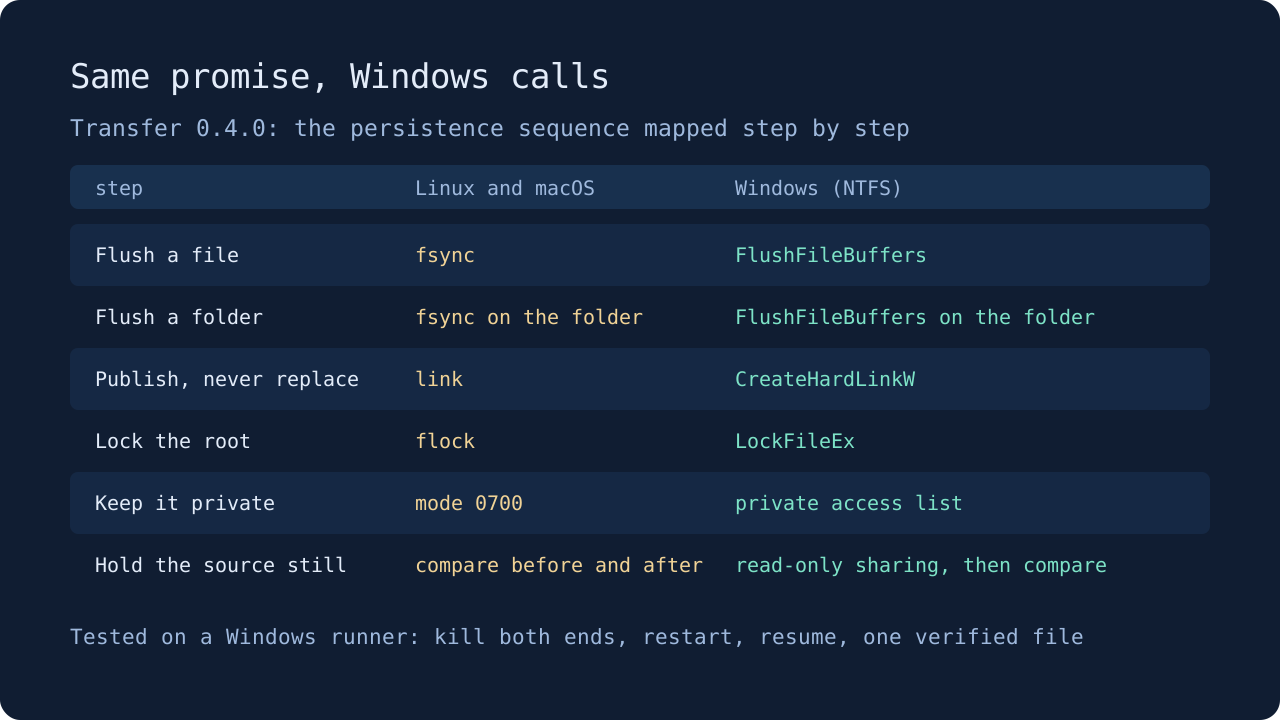
What was different
Windows won’t flush a file through a handle that was opened only for reading. Transfer re-checks stored chunks through read handles all the time, so on Windows it opens a second handle with write access, confirms it names the same file and flushes that. Folders work the same way.
Mode bits don’t exist either. Privacy is now an access list: a root or spool that Transfer creates allows only you, SYSTEM and Administrators, and every file inside inherits that. A token file that another account can read is refused, as it is on Linux.
The source file gets better protection than on Unix. While Transfer copies it into the snapshot, it holds the file with read-only sharing, so no other program can write, rename or delete it until the copy is done. If something already has it open for writing, preparation refuses to start.
Hard links work on NTFS, which matters, because they’re how Transfer publishes a finished file without ever replacing one that is already there.
How it was tested
Every existing Transfer test now also runs on a Windows Server 2025 runner, including the ones that kill the sender or the receiver at each stage and check what comes back after a restart. The race detector runs there too. The packaged Windows binary goes through the same three executable checks as Linux and macOS before publication: a full delivery with restart and clean, kills at three points in a transfer, and a TLS listener with certificate checks.
An independent review found no blockers. It did catch one real gap. The first version decided whether a receiver root was local by reading its path, so a local folder that was really a link to a network share could pass as a fixed NTFS drive. The check now works from the opened folder itself and refuses the share, and there’s a test that tries exactly that.
A real run from the public download
We then downloaded the published Windows archive onto a fresh Windows Server 2025 runner, checked it against SHA256SUMS and gave it a 64 MiB file in 1 MiB chunks. The original was deleted once the snapshot was ready. Each upload was slowed slightly so the kill would land part way. The first send got this far before we killed both the sender and the receiver:
sent 15 of 64 chunks, 15728640/67108864 bytes (23%)
sent 16 of 64 chunks, 16777216/67108864 bytes (25%)
After restarting the receiver, status said it could prove 16 chunks and was missing 48. Running the same send again started like this and finished on its own:
receiver has 16 of 64 chunks verified; sending 48 (50331648 bytes)
sent 1 of 48 chunks, 1048576/50331648 bytes (2%)
...
sent 48 of 48 chunks, 50331648/50331648 bytes (100%)
all 64 chunks verified; receiver is checking and publishing the file
The delivered file’s SHA-256 matched the original, and clean then gave back the 64 MiB the chunks held. Every output from that run is in the repository, and the same workflow can record it again for any later release.
Limits
You need Windows 10 version 1903 or later, Windows 11 or Windows Server 2022 or later, and a fixed NTFS drive. Network shares, ReFS, FAT and removable drives are refused. If another program, say a video player, holds a delivered file open without sharing it, status reports a retryable storage error until it lets go. As everywhere, process kills test crashes, not power cuts.
The README has a PowerShell line for creating a token file. Get the archive from the download page.